Compression utility pngout – a free lunch, bytes are on the menu

Pngout is a free command line utility for compressing png files without any loss in image quality. Pngout compresses PNG files really really well (10-30% savings is typical).  That translates into real dollars in terms of storage and bandwidth for large scale sites. Most importantly it reduces page load time.

If that doesn’t get you excited it may be helpful to know that pngout was written by a software genius (Ken Silverman, author of the Duke Nukem 3D engine). Plus it is free and available for Mac, Windows and Linux.

For more on the subject of PNG files and why pngout is great, here is a write up by Jeff Atwood: Getting the Most Out of PNG.

I use pngout as part of every release that adds or updates png graphics. Pngout squeezes down output from Photoshop, Paint.NET, or other graphics programs. After using this tool for several years I can say it has never corrupted a file or given me problems. On large files it is pretty slow (~30 seconds to process a complex 500kb sprite graphic).

Since I use it all the time, I wanted to share some helpful commands. I store pngout in a common spot. On windows: c:\software\pngout.exe, or on Mac/Linux: someplace like /usr/bin/pngout.

The nice thing about these commands is they work recursively, so just cd to the directory that contains your project and blast away. Running pngout on a file twice does not hurt it.

Mac/Linux:

$ find . -name "*.png" -exec /usr/bin/pngout {} \;

Cygwin:

$ find . -name "*.png" -exec /cygdrive/c/software/pngout {} \;

Windows (DOS prompt):

for /R %i in (*.png) do C:\software\pngout "%i" /y


Additional thoughs for using pngout:

  • I recommend building pngout into your development process. Could be any of the following:
    • Pre-check in process developers are responsible for.
    • A build step.
    • A merge to trunk step.
    • A Jira reminder for the BDFL before each release.
    • Either way pngs are automatically compressed before the feature ships. It is too easy to forget about pngout otherwise.
  • Pngout should be used before uploading PNG files to a CDN.
  • Pngout can be called on the server side after a user uploads an image. However since pngout can be slow, I would advise setting up a background job for the compression step, as opposed to making the user wait for the compression.


Pngout download page

Posted in Application Development, Sys Admin | Tagged , , , | 2 Comments

Laurence’s List – Roadmap Features to Prioritize

Is the number of issues in your backlog into the triple digits?  Angry customers, bugs that have you tangled in spaghetti code, the talking head just changed the spec AGAIN!!!… and now the President comes to your desk and says payroll can’t be met unless feature X ships on Friday…

spaghetti code - pure code unit tests not included

We’ve all been on chaotic software projects. Here is a formula to prevent it, or at least fight back. It is based on logic AND business experience, so you can’t lose:

backlog whiteboard sticky notes

First, make a roadmap so you can navigate:

A software roadmap is the equivalent of a business plan.  If you don’t have a roadmap, make one.  Professional ones look like typical spec docs or excel spreadsheets, but the most useful are drawings on paper like trees or ‘maps’ – cool concept.

To help guide planning, items on the roadmap should be grouped into the following categories. The higher on the list the more important it should be.  The priorities are based on customer satisfaction, which drives revenue, which drives platform upgrades, which drives more customers. It is a cycle.

Be careful if too much of your work falls below priority 8 on the list… if that is the case you are spiraling down, not up like you would like to be.

Typical sources of work on a software project, in order of priority:

  1. Bugs – fix these first.

    1. This is not a new idea, in fact it is criteria #5 on Joel’s list from way back in the year 2000 when Napster was still alive:
      Do you fix bugs before writing new code? 

    2. It is easier to fix bugs if you have good logging and customer feedback mechanisms in place to catch them.

    3. Consider this a cultural issue and a technological issue.

    4. Leaving bugs out there is fine if you don’t care about your customers, or the system is so far gone some bugs will just never be fixed.

  1. Items that directly relate to bringing in money.

    1. No revenue = no paycheck.

    2. Hopefully this is the bulk of what is being focused on.

    3. If your tasks don’t relate to bringing in money, see: the writing on the wall…

  2. Items that improve the initial user experience, enhance the trial experience, or increase compatibility with other platforms / systems.

    1. If your system includes a trial period, make sure it is rock solid awesome.

    2. Features that increase compatibility with other systems makes it easier for users to switch to your software.

    3. For some businesses, #3 is really the same thing as #2 Items that directly relate to bringing in money, so these items should be pretty high on the list, especially for startups.

  1. Infrastructure improvements – anything that will turn into a fire in a year or less if not addressed.

    1. Examples are scaling limitations, backups, security, dependencies on unmaintained packages (see software ghettos), database design that doesn’t cope well with upcoming requirements.

    2. Stay well ahead of these and your overall time fighting fires goes down considerably, perhaps close to zero which is as good as it gets.

    3. Every few months assumptions about the infrastructure should be checked.
  2. Items that influencers would like to see in the product before they will endorse it.

    1. These are the golden nuggets to add to your road map as high priority items.

    2. Influencers are worth trying to please if they send users your way or help build features experts would want.

  3. Features not in your system which are supported by the competition.

    1. This is part of the table stakes question – what is the minimum set of features required to be viable in the market?

  4. Items that expand your feature list, but are more or less ‘buried’ features only a few of the highly devoted users will enjoy.

    1. By doing a few of these on a regular basis, the loyal fan base will be kept happy.

    2. The nice thing is you don’t have to do them right away. Do them when convenient.

  5. Chasing fires rather than putting them out properly.

    1. In software, fires are the interest on technical debt.

    2. See #1 Fix Bugs First, as the solution to this one.
    3. Fires can get out of hand if left unmanaged. They are, unfortunately, a fact of software development.

    4. If this is most of your job, see: the writing on the wall…

  6. One huge customer / stakeholder / investor has you on a short leash.

    1. If you let a 500 pound gorilla dictate what features get done next, you will probably be in trouble later.

    2. Being on a short leash generally involves customization for a particular use case.

    3. Stay focused on things that benefit your platform and the broader market while keeping the lights on.

    4. Don’t steal the profits from the big contract and call it a good business. Reinvest the profits into your platform so you can have many more customers down the road.

  7. Reacting to loud customers.

    1. If the loudest users determine the schedule, you may end up building features that only 1% of the user base cares about.

    2. You could also end up changing things so they work in a different way, alienating the users who like it they way it is and are happily silent.

  8. Engineering for the sake of it.

    1. Caution: The next monument to computer science is waiting to be born.

    2. If the engineers decide what to build, they will be having all the fun!

    3. Having fun is great, and should be practiced daily.

    4. However, too much fun of this nature almost always leads to something that doesn’t address a real market need. At best, it is using a sledgehammer to crack an egg *splat*.

What about relative effort / task size?

My thought process is to balance the big, medium, and small tasks. It is tempting for any business to continually delay the big items, because the small items are ‘cheap and easy’. Addressing the big items usually means shoring up the foundation, paying down technical debt, or building large new feature sets which can be risky. Consider where the system will be in 6 months if only the small items get done, and go from there.

Images courtesy of Flickr Creative Commons with Attribution:
Photo 1 by the Italian Voice
Photo 2 by roolrool
Posted in Application Development, Business, For New Developers | Tagged , , , | Comments Off on Laurence’s List – Roadmap Features to Prioritize

Pros and Cons of RDS vs EC2 for MySQL with AWS

I recently published a benchmark of EC2 vs RDS MySQL performance.  This article is a follow up to that. Specifically, I’m comparing EC2 vs RDS in the situation where one EC2 instance is being used as a combined app server and database server and it is time to upgrade because of load.

When a single EC2 server hosting both the app and the db is getting too much load, here are some options for scaling up:

  1. Scale vertically (upgrade to the next largest instance).  This is very simple. It can sometimes be done in place if you can handle the down time.
  2. Split the application server and the database server into two EC2 instances.

    Amazon RDS introduces a 3rd option:

  3. Migrate the database to RDS.

In cases 2 and 3, going with a 2-tier approach introduces network lag when querying the DB, hopefully this is negligible. Adding an extra server without a high availability configuration reduces up-time, since there is now an additional single point of failure. Multiple specialized servers pave the way for greater scaling down the road and provide flexibility.

The hosting cost is nearly equivalent:

With AWS the cost scaling vertically, adding an extra EC2 server, or adding a RDS instance is roughly the same (which makes sense because the cost boils down to RAM/CPU resources).

So, what it really comes down to is the cost of your time to setup and maintain all this.

Option #1 is the simplest to implement: plop in more physical resources via the control panel.  There is a limit to how far vertical scaling can be pushed. For systems that have very high load, or anticipate very high load in 1-2 years this probably isn’t appropriate. I still like this option for teams that don’t have a dedicated sysadmin or devops position.

Adding another EC2 instance is the most complex route since you are on your own in terms of configuration, management, monitoring and patching.  Then again, you have total freedom to configure it however you want.

That leaves RDS is in the middle, perhaps the sweet spot, but as always it depends... RDS comes with automatic backups and maintenance out of the box. RDS also features the intangible 15% performance boost over an EC2 MySQL instance as I found in this article. There are a few drawbacks to RDS if you are doing very complex operations that require SUPER privileges or you have high security needs. Don’t use RDS if your data must be encrypted at rest, since RDS is effectively shared database hosting. I would not store PHI (protected health information), credit cards, or social security numbers in RDS at this point.

What about redundancy and backups? It is not IF but WHEN a hardware failure will occur.

Running mysqldump on a regular schedule, encrypting the dump, and pushing it to a geographically distant server (or S3) is essential. I prefer to copy my encrypted dumps completely outside of AWS when feasible.

However, even if mysqldump is ran every hour it might not be good enough for the business case at hand. What if the goal is to have as little data loss as possible given a failure?  In my ideal world, the data is replicated to geographically distant data centers as changes happen.

MySQL replication can be used for this, but doing it over a WAN might not be the best idea since the connection cannot be guaranteed. MySQL replication adds load to the server, eats some bandwidth, and requires a slave to be setup. Enabling replication may require application code changes to ensure all SQL is replication safe. For example INSERTS, that use UUID() are not allowed with MySQL replication.  MySQL replication needs to be monitored to ensure the data stays in sync. Plans need to be made to handle situations where drift occurs between the master/slave and when the master fails. At this point, you really need a DBA to handle this.

RDS offers yet again a 3rd option called Multi-AZ:

Multi-AZ stands for multi availability zone. RDS with Multi-AZ syncs to a slave server in an adjacent availability zone. Multi-AZ costs 2x, and handles failover for you.  Availability zones are basically next door, not geographically distant. Replication is file system based, and does not use MySQL replication.

As of May 2013, I wish RDS had Multi-Region support!  That would be sweet, but no doubt clog the pipes between Amazon’s regions because all the data redundancy geeks like me would jump on it.

Multi-AZ is probably worth it for most businesses, even if there is only a 90% chance it will actually work correctly. The July 2012 outage brought up a lot of complaints from a few noisy customers:

Amazon’s official response [http://aws.amazon.com/message/67457/] said that only a fraction of users experienced the failure, and most users failed over without a problem.

If you do go with Multi-AZ, make sure to understand the way Multi-AZ fails over:

The failover relies on DNS based host remapping and a short ttl (3 minutes). There will be downtime in this situation.  It is also possible different servers in your cluster could be talking to different databases for a short time during the failover. Assuming the master is completely down, that might not be a problem, but who knows?  The uncertainty around this sort of question is why database failovers are normally a human initiated action, not a decision made by a computer. As always it depends…

For more information please see the AWS RDS FAQ.


Posted in Data, Sys Admin | Comments Off on Pros and Cons of RDS vs EC2 for MySQL with AWS

AWS benchmark of MySQL 5.5 RDS vs EC2

MySQL benchmark of AWS RDS vs EC2 with complete results and instructions on how to recreate on your own for under $0.25.

Update 9/15/2013 – Added bar charts to compliment tables.

I found a couple blog posts with benchmark data specifically about MySQL on EC2 instance vs RDS.

Both posts use a tool call sysbench, a great tool for benchmarking MySQL performance on cloud systems.

The blog posts above don’t specify the MySQL version being tested. To add to the patchwork of the internet, I went ahead and ran my own set of tests against an AWS EC2 m1.small Instance of Ubuntu 12.04 64-bit running MySQL 5.5 vs an AWS RDS small instance of MySQL 5.5.

Tests:

  1. The first test is with a relatively small database (228MB) that can be entirely loaded into memory.
  2. The second test is with a database that is ~ 2.2GB, too big to fit into memory on a small instance.
  3. I then applied a standard tuning setting to the EC2 instance to see how that compares (set innodb_buffer_pool_size=1200M).

Both tests use 25 threads. At first I repeated each test twice to check consistency but was satisfied the results are consistent test to test from sysbench.  Complete configuration and command notes are listed below, but first, let’s get to the results!

Results:

Test 1 – 228MB database, 25 threads
RDS EC2 EC2 Tuned
Transactions/sec 114 99 100
Read/write requests/sec 2174 1886 1908
Min (ms) 18 29 28
Avg (ms) 218 251 248
Max (ms) 1359 6781 6354
95th Percentile (ms) 544 610 572

rds chart 1

rds chart 2


Test 2 – 2.2GB database, 25 threads
RDS EC2 EC2 Tuned
Transactions/sec 106 84 92
Read/write requests/sec 2018 1597 1745
Min (ms) 25 30 18
Avg (ms) 235 297 272
Max (ms) 907 5336 11085
95th Percentile (ms) 445 670 668

rds chart 3

rds chart 4


In the case of Transactions/sec and Read/write request/sec – higher numbers are better. In the case of (ms) stats – lower numbers are better.

Conclusions:

  • A small RDS instance, out of the box is ~15% faster on a transaction basis than an m1.small EC2 instance even with tuning.
    • The observu blogger reported performance differences as high as 240% against a 50GB database with 50 threads. This test was unable to replicate that much of a difference, however, this test was done with much a smaller database and half the threads.
  • There is no noticeable difference from tuning on a small database. That makes sense because the entire DB was in memory even without tuning.
  • The 95% percentile response time numbers are interesting. RDS keeps the lid down 11% better against the small db, and 33% better with the large db.

Why is RDS faster? My thought is RDS is running on better I/O hardware than a vanilla m1.small instance backed by EBS. This effect may become more prominent when running against a very large database, like a 50GB database where most of it cannot be loaded into memory.

On an RDS instance, Amazon sets the innodb_buffer_pool_size to DBInstanceClassMemory*3/4 of the system memory by default, but this looks closer to 70%:

SHOW GLOBAL VARIABLES LIKE 'innodb_buffer_pool_size';
> innodb_buffer_pool_size = 1179648000

RDS gives you other nice to have features, like automated backups and free minor upgrades (but at the cost of a 4 hour per week maintenance window).


It is always fun to ‘put in a quarter’ with EC2 and spin up some test servers.

Complete setup notes for recreating this experiment on your own:

This experiment used a single EC2 small instance as the test initiator.  All servers are in the same availability zone to minimize network effects. Make sure to separate the load test machine from the target machine.  If you are running sysbench from the same box that MySQL is running on, that is not a fair test. Otherwise the load test threads will compete directly against the database process for system resources which leads to skewed results.

1) On Load Test Machine – install sysbench and mysql client:

sudo apt-get install sysbench mysql-client-core-5.5

2) Create a 5 GB Small RDS instance of MySQL 5.5.27

# all done through AWS control panel.

3) EC2 MySQL Server:

Standard m1.small instance, 1.7GB RAM, Ubuntu 12.04 64-bit, root device is EBS, no attached EBS storage. Make sure to setup the security group so 3306 is open to the load test server.

sudo apt-get install mysql-server
#Edit my.cnf for TCP/IP settings
sudo vi /etc/mysql/my.cnf
#set bind-address = 0.0.0.0
# left everything else at default
sudo service mysql restart

Grant the user access – NOTE: this is convenient and REALLY INSECURE, hey this is a load test.

#login to the server as root:
$ mysql -u root -p
GRANT ALL ON *.* TO root@'%' IDENTIFIED BY '****';
FLUSH PRIVILEGES;

4) On both the RDS instance and the EC2 MySQL instance create a new database called ‘sbtest’.

5) Prepare for Test 1:

Sysbench first ‘prepares’ the test database by creating a single table with as many rows as you like. Our test will have 1 million rows in the test database. This results in about a 228MB database.

rds test 1

The prepare command:

sysbench --test=oltp --mysql-host=host --mysql-user=root --mysql-password=**** --mysql-table-engine=innodb --oltp-table-size=1000000 --max-time=180 --max-requests=0 prepare

(run this against both the RDS and the EC2 machine)

The run command:

sysbench --num-threads=25 --max-requests=100000 --test=oltp --mysql-host=host --mysql-user=root --mysql-password=**** --mysql-table-engine=innodb --oltp-table-size=1000000 --max-time=180 --max-requests=0 run

The default sysbench test is ‘complex’ which does a lot more than simple SELECT statements. For comparison with other benchmarks, I left the settings at the default.

6) Prepare for Test 2:

To run test 2, repeat the prepare and run commands, but up the table size to 10M.  You need to drop the sbtest table first. It took awhile to load the 10M rows…

rds test 2

7) Run Test 2:

Same as before, just higher –oltp-table-size.

8) Test with EC2 ‘tuned up’:

For the 2nd set of tests on the EC2 instance, I increased innodb_buffer_pool_size to 1200MB in the my.cnf file and restarted mysql. I also made sure the number of rows was correct for each test.

innodb_buffer_pool_size=1200M
Posted in Data, Sys Admin | Tagged , , , , | 1 Comment

HTML5 Canvas Font Rendering Results

Just launched the first version of an online product builder for Pacific Headwear at CapBuilder.net. It makes intensive use of HTML5/Canvas technology. What a fun project!

This project pushed the limits of Canvas technology and replaced the previous Flash based cap builder Pacific Headwear was using. One of the biggest challenges was making sure the builder would perform reliably across a wide variety of platforms and browsers, including the iPad and iPad with retina display. If you are willing to drop older browsers it is possible. SVG rendering was an alternative that was explored, but the Canvas rendering approach proved more successful for our needs.

The letters are rendered using the fillText() Canvas method. That method is extremely primitive and gives ‘just enough’ to get by. Features the builder needed to make it shine include curved text, outline text, and scaling. None of those features are supported out of the box with Canvas. I implemented these features by creating a library of reusable widgets.

Here is a quick code sample of how to render text in Canvas:

var canvas = $('#canvasTest')[0];
var context = canvas.getContext('2d');
context.font = "normal 60pt arial";
context.fillStyle = "#FFFF00";
context.fillText("HELLO WORLD", 0, 0);

The purpose of this post is to share the cross browser rendering results of the fillText() method. It also points out, to my astonishment, that at this point in time, Chrome has the worst rendering with fillText() out of all the major browsers. I am amazed to report that IE9 and IE10 on Win7 and Win8 clearly beat Chrome 26 and Firefox 20.0  at making text look good with the fillText() canvas method. Note how the Chrome and Firefox samples on Win7 and Win8 are jagged and lack anti-aliasing. We call them the ‘jaggies’.

Here is a side by side comparison: 

Chrome 26 Win7 vi IE9 Win7 canvas fillText

I commented on Chrome bug #7508, which captures the issue completely. It was originally reported in February of 2009. Anti-aliasing is an intensive rendering step. Naturally this needs to be done with care, perhaps with a way for developers to turn it on/off. This is better than implementing it wholesale and screwing over everyone who likes it the way it is. I appreciate their prudence, but not the fact that all other browsers default to anti-aliased rendering.

The Canvas fillText() Rendering Results – April, 2013:

Win7 – Chrome and Firefox have jaggies, IE looks perfect, Safari is okay:

Chrome 26 Win7 canvas fillText

Firefox 20 Win7 canvas fillText

IE9 Win7 canvas fillText

Safari 5.1.7 Win7 canvas fillText

Win8 – Chrome has jaggies, Firefox is much better over the Win7 version,  IE10 is perfect, and Safari is about the same as Win7:

Chrome 26 Win8 canvas fillText

Firefox 20 Win8 canvas fillText

IE10.0.8x Win8 canvas fillText

Safari 5.1.7 Win8 canvas fillText

Mac OSX 10.6.8 – everything looks great on the Mac:

Chrome 26 Mac canvas fillText

Firefox 12 Mac canvas fillText

Safari 5.1.8 Mac canvas fillText

iPad4 – could be a little sharper but no jaggies:

iPad4 canvas fillText

Posted in Application Development | Tagged , , | Comments Off on HTML5 Canvas Font Rendering Results

MySQL query for obtaining unique list of domain names with count from email field

The following MySQL query is useful for getting a count of all the domain names used by email addresses in your database.  It isolates the domain name (after the @ sign) in the email field.

SELECT substring_index(email, '@', -1), COUNT(*)
FROM login
GROUP BY substring_index(email, '@', -1);

It can also be used to track down spammers or disabled accounts:

SELECT substring_index(email, '@', -1), COUNT(*)
FROM login
WHERE status = 'disabled'
GROUP BY substring_index(email, '@', -1);

Link to MySQL String functions reference.

Link to MySQL substring_index() function.

When I find a useful little snip like this I like to share it (and document it in my blog so I can remember it)!

Post inspired by: http://stackoverflow.com/questions/2440429/mysql-query-to-count-unique-domains-from-email-address-field

Posted in Code, Data | Comments Off on MySQL query for obtaining unique list of domain names with count from email field

Using your browser as a dev tool to test HEAD requests

A HEAD requests check to see if the resource exists, and what kind of data it might provide.  The key to a HEAD requests is the response contains no data, headers only.

I’ve been noticing HEAD requests resolving as 404 errors in one of my application log files. I think these are coming from sites like Facebook, when a user posts a link to a page in the app, FB will initiate a HEAD request before doing a GET. FB is pretty clever about pulling in the contents of a linked page and showing the title, summary, and a mini gallery.

To fix these issues, what I do is go into the route file and add the proper responses.  Here is an example using the PHP FatFree framework. Note the HEAD statement in the first part of the route:

F3::route('HEAD /page/@name', function() {
  // Call a function that does:
  // 1. Validate URL.
  // 2. If /page/@name is okay, you're done, send back no data.
  // 3. But, if /page/@name would normally throw a 404 
  //    then the HEAD response should also throw a 404.
}

At this point, how do I test that the HEAD route is working?

Well, it turns out you can use your browser as the testing tool.  This uses the XMLHttpRequest() object, so it will only work if you are already at the local dev URL, but it works perfect for me for what I’m trying to do.

Paste this into your JavaScript developer console:

testHEAD = function(url) {
  var xmlhttp = new XMLHttpRequest();
  xmlhttp.open("HEAD", url, true); 
  xmlhttp.onreadystatechange=function() {
     if(xmlhttp.readyState==4) { 
       console.log(xmlhttp.getAllResponseHeaders());
     }
  }
  xmlhttp.send(null); 
}

Then run:

testHEAD('page/123');
// sub in whatever URL you really want to test

For more information, HTTP 1.1 Method Definitions Here:

http://www.w3.org/Protocols/rfc2616/rfc2616-sec9.html

“The HEAD method is identical to GET except that the server MUST NOT return a message-body in the response. The metainformation contained in the HTTP headers in response to a HEAD request SHOULD be identical to the information sent in response to a GET request. This method can be used for obtaining metainformation about the entity implied by the request without transferring the entity-body itself. This method is often used for testing hypertext links for validity, accessibility, and recent modification.”

Note the keyword ‘SHOULD’ there, which means the content length header is not required – whew! That would be a lot of work for the server just to generate a page and toss it.

This technique has actually been around for a long time in browsers like Chrome and Firefox. I was inspired by Chris T’s response to this StackOverflow question:

http://stackoverflow.com/questions/1976442/how-do-i-send-a-head-request-manually-using-firefox

Posted in Application Development, Code | Tagged , | Comments Off on Using your browser as a dev tool to test HEAD requests

The Art of Spreadsheet-Fu – tips for manipulating data with Excel, OpenOffice, or Google Drive Spreadsheets

This post demonstrates 5 examples of Spreadsheet-Fu to make quick work of menial data formatting tasks. Spreadsheet programs have useful functions built into them for string manipulation (concatenation, search and replace, formatting, etc).   It used to be just Excel and Open Office Calc, but now Google Drive Spreadsheets has functions too!

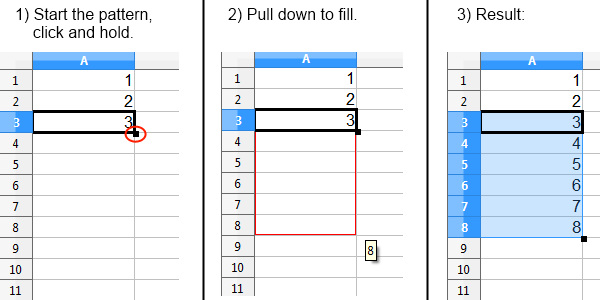
The key, grasshopper, is what I call the ‘pull down’ trick, by which the spreadsheet program will substitute relative cells or follow through with patterns. Starting with A1 = 1, A2 = 2, and A3 =3, selecting that range and pulling down will start numbering from there. Nice way to get a range setup quickly:

excel pull down trick 1

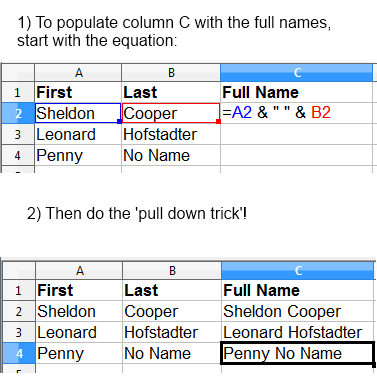
The pull down trick can also be combined with equations that do string concatenation.  The concatenation operator is the &.  To put two columns together, with a space between them, add the following equation to a cell by starting it with the equal sign:  =A1 & ” ” & B2.  Tip: The F2 key is a handy way to jump into cell edit mode.

excel pull down trick 3

This speeds up bulk data manipulation. The nice thing is, spreadsheets are a non-programmer friendly format, and I can often arrange for non-technical team members to take care of filling out the data. I take it from there and build some equation to get the desired result.  This technique was originally valuable to me in crafting SQL updates and inserts, but on a recent project I have found it a gold mine for generating JSON.

Story 1 – bulk file rename:

I ran into a situation where I needed to bulk rename thousands of files to lower case.  First I got the list of files as a text file.

$ ls -1 > file_list.txt

Then, I opened that file and pasted its content into my spreadsheet. It automatically created a new row for each line.

Then I added this equation into B1:

="mv ./" & A2 & " ./" & LOWER(A2)

After using the pull down trick, I had a list of commands I could paste into the console, or make into a little shell script and execute.  I’m sure there is more than one way to skin a cat when it comes to bulk file re-names, but this worked for me.

Story 2 – text to columns:

Sometimes you are given data that is delimited somehow, by underscore, pipe, or some random character, and that needs to be broken up into multiple rows. Check out the  Data -> Text To Columns… feature.

excel pull down trick 4

From there, you can go on your merry way with the data, slice and dice as needed. Note – this feature was not originally part of the default Calc install, but now it is. It might be called something else in Excel. It doesn’t appear to exist yet in Google Drive Spreadsheets.

Story 3 – database update to lots of records:

Imagine a database where arbitrary updates need to be applied to several hundred records. Don’t ask me why, but sometimes it comes up. The admin page was never written, the DBA is long gone – who knows… I’ll show you how to get it done quickly:

Use the concatenation technique from story 1 above to build your UPDATE statements:

="UPDATE devices SET category = '" & B2 & "' WHERE id = " & A2 & ";"

excel pull down trick 2

Story 4 – JSON powering JavaScript app:

Some JavaScript apps don’t really need a backend database with a REST API that emits JSON.  In fact, it often makes sense to just embed the JSON directly as a JavaScript object. I’m really loving this approach on a recent project, because the customer can maintain the spreadsheet on their own. I push changes into the code base with a simple copy and paste. Note you can always build out a REST API and database back end later – and we intend to. For now, this is working wonders and saving lots of time and money:

="PRODUCTS['" &A2 & "'] = {name: '" &B2& "', color: '" & C2 & "', price: " & D2 & "};"

excel pull down trick 5

Examples available:

The examples above are available in this practice sheet I made in Google Drive.

Taking Spreadsheet-Fu Further:

Here are links to all of the functions available by program:

Aside from typical string functions, IF/THEN is supported. The syntax is awkward as the semicolon is the delimiter between arguments. If you need a lot of IF/THEN statements, or nested IF/THEN it starts to get hard to read so it may be better to write a script.

Have fun practicing your spreadsheet-fu!

Posted in Data, For New Developers | Tagged , | Comments Off on The Art of Spreadsheet-Fu – tips for manipulating data with Excel, OpenOffice, or Google Drive Spreadsheets

A Critique of JavaScript MVC frameworks – Beware of Rampant Asynchronous JavaScript Calls

Software professionals should be aware of the limitations that come with the current trend of building asynchronous heavy web applications. We are seeing a surge in serious and large scale JavaScript applications at the enterprise level.

Here is a list of the top 12 JavaScript MVC frameworks, with the top contenders being Ember.js and Backbone.js. Yes – this is MVC in the client!

backbone js logo

ember js logo

In general, AJAX driven applications are a huge improvement over the classic request/response paradigm where the entire page refreshes for each action. In an AJAX powered MVC framework every time the user does something, the client goes out to the server to persist state or obtain new data. In a simple app with only a handful of entities, no problem. However, for a large scale system with hundreds of tables I have a serious problem:

Excessive service calls are bad because:
A) They slow down responsiveness.
B) They introduce brittleness.
C) They promote poor service layer design.

A) Excessive calls slow the site down:

Often times I visit a site for the first time, and immediately see one or more ‘loading…’ indicators. Major products that do this include AdSense, Facebook, and the Jira dashboard. It makes me want to click away.

It is notable that GitHub and BitBucket load more or less ready to go, without excessive server calls during page load. In my philosophy, if you are already doing a round trip to the server, assemble everything the page needs and send that as one unit. Do not send an empty shell that triggers a series of additional round trips, and hope your users will “sit tight”, which they won’t.

A core value of any product should be to keep users engaged, interested, and coming back to the site time and time again. A customer’s first experience with an application has to be super fast, and the product should continue to respond adequately as they delve deeper.

When it comes to user events, like a button click, one round trip is totally fine – provided a spinner appears and there is some semblance of progress. However, if the model layer inside the UI is just as fine grained as the back end data model, and the RESTful layer mirrors the data model (which is sadly the default of most REST frameworks), the UI layer ends up having to make several calls back to back to get the page into the correct state.

B) Excessive calls introduce brittleness:

Sometimes, due to the very nature of TCP/IP, packets get lost, and asynchronous calls either won’t make it to the server, or the response won’t make it back. This kind of thing almost never happens on localhost (where 99.9% of development happens), but it does happen all the time in the real world. Think about the last time you clicked a link and it didn’t work, but clicking it again did – it does happen!

A RESTful layer should be hardened so that it cannot put the data on the backend into a corrupted or illogical state. However, if an asynchronous call fails, the UI could get into an odd state as well. A lot of exception handling and timeout code needs to be there, ready to compensate. Your application and business case might not tolerate a spinner running continuously. Even google docs just ‘temporarily lost connection to the google server’ as I was writing this, and it interrupted my train of thought. Thankfully this is just a blog post, but if I was writing something serious like a drug prescription, or a complex legal note, the situation would be different.

C) Excessive calls are just poor design:

The data model and the business logic are different layers. Unfortunately the default for many REST API frameworks is to mirror the data model one to one. Doing that is amateur and completely silly. Any non-trivial application relates many different entities at once to provide value.

Think of your REST API like a service layer not like a data layer. Design the REST API to model your business services, not your actual data model.

Check out the ‘Service Layer’ pattern in Patterns of Enterprise Application Architecture (P of EAA). If you don’t own it, P of EAA is a great book.

In conclusion:

Lots of JavaScript heavy apps will get wrapped around the axle on the issue of excessive service calls. Make sure you are aware of the limitations of any framework you choose. One way to combat limitations inherent in JavaScript MVC frameworks like Backbone.js and Ember.js is to design the ‘model’ the web app consumes to be robust, minimize service calls, and maximize user happiness. JavaScript programmers are architects now!

Posted in Application Development | Tagged , , , , | Comments Off on A Critique of JavaScript MVC frameworks – Beware of Rampant Asynchronous JavaScript Calls

Thoughts on Require.js and a simpler approach to loading JavaScript

Require.js is trying to solve the problem of dealing with lots of JavaScript. I have used it with Backbone.js, underscore, Dojo, and jQuery. It works well, but it does take some effort to get it configured and running within your project.

“When a project reaches a certain size, managing the script modules for a project starts to get tricky. You need to be sure to sequence the scripts in the right order, and you need to start seriously thinking about combining scripts together into a bundle for deployment, so that only one or a very small number of requests are made to load the scripts.” – from the Require.js home page

I completely agree with this.  An application’s JavaScript architecture (yes that is a term now) is something to be aware of and plan for from day one.

No matter what, it is WORK to get JavaScript loading right.  What I optimize for: first user experience, second developer experience. Require.js has potential to go against the grain at times on both these points if you are not careful. I have a simpler approach, which I demonstrate below.

Let’s talk about user experience first:

Require.js can delay UI behaviors and encourages asynchronous loading which is error prone.

“You may also want to load code on the fly, after page load.” – from the Require.js home page

What? No!!!!  Don’t do that!  Never take the network for granted. What if the wifi drops packets? Full stack developers know – you can’t guarantee the newly requested JavaScript code will actually load.  This is why nested dependencies don’t sit well with me, especially ones that are setup to load on the fly.

The way a ‘software engineer’ would handle this is to write a lot of try/catch and timeout code to re-attempt the download. If it ultimately fails, you’d need to deal with alerting the user – “sorry, we lost connectivity and now half the script is loaded, but you should probably refresh now to fix it.”  What a pain for everyone.  It is not easy to replicate bugs like that, but they will happen.

My approach is to simply avoid loading JavaScript asynchronously.  Look at all the bugs I fixed and the code I don’t have to write now!

Something going wrong network wise is a bit of a corner case. More importantly – think twice before making your user wait for extra libraries to load when they click a button! On your local development machine it will be instant. On a smart phone out in the woods, it might take 30 seconds – enough to drive someone nuts.

My solution is to treat a dependency as all or nothing proposition. Either library X becomes a script tag in the page, or its not included in the page. Library X could be a bundle of items specific to that page or feature.

To be fair – the Require.js framework provides a module called the Optimizer that bundles up scripts into one file.  You will need to explicitly configure it to avoid this situation. It can be done, but that brings us to our second point -developer experience:

Require.js fights the global nature of JavaScript:

The boiler plate nature of the method declaration in Require.js started to bug me. It reminds me of dependency injection on steroids.   It looks safe when you have one or two dependencies, but beyond that it starts to get tedious.  With four dependencies this is starting to get ugly:

require(["helper/utilA", "someUtilB", "anotherUtilC", "path/to/utilD"], function(utilA, utilB, utilC, utilD) { ...

Require.js takes dependency injection to the extreme. For example, dependency injecting jQuery into a method just doesn’t make sense to me. Same goes for underscore.js or any other base library. Yes you could do a mix of globals with Require.js, and maybe that is the best approach, but that isn’t how their documentation reads.

Loading jQuery in the global scope is okay with me since it is used almost everywhere in a global nature – as it was designed to be.

If you are worried about unit tests, don’t be.  Since JavaScript isn’t a strongly typed language there is nothing stopping you from loading a different global $ object and using that as a mock in a unit test. No reason to apply Java techniques to JavaScript just because.


What I do to organize my JavaScript is very simple:

My preferred way is to have a build script that combines and compresses the JavaScript for production mode. That way, there is less to download when the site is live, and I know exactly what is being loaded. In development mode, the site template loads the uncompressed JavaScript so it is easy to debug. This is the best of both worlds. I have not ran into a situation where this approach becomes problematic or limiting. The approach is minimalistic, serves the end user very well in terms of super fast page load times, and it doesn’t get in my way at all as a developer.

My latest web based project has over 50 different JavaScript dependencies (mostly custom classes that power Canvas based rendering logic). They are loaded in the correct order and everything works just fine.

Here is a basic example. Using bash, the .js files get combined and compressed using YUI compressor into combined.min.js.

#!/bin/bash

# This script generates the following:
#   Combined and minified javascript file for use in the app 

echo "Combining JavaScript into temp files."

# temp.js is the uncompressed file with everything combined
cat ./app/js/jquery.js \
./app/js/file1.js \
./app/js/scriptX.js \
./app/js/xyz.js \
> ./app/js/temp.js

echo "Compressing Combined JavaScript."
java -jar yuicompressor-2.4.7.jar --type js -o ./app/js/temp.js --charset utf-8 ./app/js/combined.min.js

echo "Cleaning up temporary files."

rm ./app/js/temp.js

How the page loads the scripts:

<? if(ENVIRONMENT == "production") { ?>
  <script type="text/javascript" src="js/combined.min.js"></script> 
<? } else { ?>
  <script type="text/javascript" src="js/jquery.js"></script> 
  <script type="text/javascript" src="js/file1.js"></script> 
  <script type="text/javascript" src="js/scriptX.js"></script> 
  <script type="text/javascript" src="js/xyz.js"></script> 
<? } ?>

If a script is a dependency, why not just load the dependency up front? There are cases where you would want to load something special – like a spreadsheet widget, but only on certain pages. In that case, great, just include the script tag in the necessary places in the app, and program the build script to generate it.


Posted in Application Development | Tagged , , , , | Comments Off on Thoughts on Require.js and a simpler approach to loading JavaScript