Software Ghettos – A Form of Technical Debt

A few years ago I was talking to a senior Java engineer. He was asking me about Django and Python. Having never used the stack himself, and thinking that ‘scripting languages are just toys’, he was skeptical of this new framework and its potential. I went on to explain that Django is pretty neat, the admin feature is a real time saver, and Python as a language just makes sense in so many ways (dictionaries, lists, etc). Then I explained how I had recently met someone at a meetup who only knew Python. This person was using Python for everything, including web services, worker queues, and even business logic! Java shines in those areas of course, and people with Java centric backgrounds often do not realize the serious competition Java has from scripting languages!

Then he coined the term: Django Ghetto

In a sentence:
Man, using python for all that? That guy is working in a Django Ghetto!”

I don’t have a problem with an all Python shop. Scripting languages make sense for many businesses.  I do think it is important for developers to know multiple languages and platforms.  This gets a person beyond being a fan boy/girl for one technology because it is all they know. However, the point about the ghetto is interesting, and I do think as professionals we should be aware of software ghettos.

Software gehtto

My definition of software ghetto:

The more low quality open source projects your project depends on, the more ghetto your project is.”

What is a low quality open source project?

  • Low commit rate
  • Few developers
  • No unit tests
  • No documentation (or worse hard to follow documentation)
  • Narrow platform support
  • The project itself depends on many other low quality open source projects
  • Lack of direction
  • Snooty developers who think their way is the only way – also known as the ‘its free, screw you’ mentality

This is a very common situation in many plugins for CMSs like Drupal / WordPress / Joomla. It can also happen in projects written using popular frameworks. Inevitably the community works on the NEXT version of the framework, abandoning the current version, and forcing you to upgrade. It is not necessarily a bad thing to stay current but there is a cost to upgrading. I would argue the cost of not upgrading is ultimately much higher.

One issue I have with using lots and lots of dependencies (maintained or not) is the added complexity in keeping it all running smoothly as one unit. Just remember: You may very likely be the ONLY one in the world running your specific combination of dependencies (down to the release version), in your specific environment. When you start throwing high load at the server, or trying to get the UI to work across 5 major browsers, that is where the real work starts.

The other issue I have with dependencies is related to human nature. People share open source code on Github or Bitbucket for the joy of it or to get some street cred, but generally not for income.

The irony is, as a project succeeds, bugs are logged, feature requests start pouring in, and soon enough it becomes a job. The original idea the developer nurtured has grown up, left the nest, and what is left behind is a pile of maintenance tasks. Most developers are not up for doing maintenance for free, even on their own code. Some do stay committed and are able to grow a healthy community of contributors, but that is the exception unless they have a benevolent manager or other sponsor for the project.

The kind of projects I hesitate to adopt are the small to medium size scripts or libraries that solve a specific problem really well, at a current point in time. These are more like ‘examples’ than real projects. There a tons and tons of these on Github related to HTM5/Canvas, Node.js, and just about any other current software trend.

What I look for: a sane group of dedicated contributors (a corporation or two backing the project is okay with me), top notch documentation, an active forum, and a complete set of unit tests. My solution is to also be prepared to refactor/swap things out down the road. Object oriented principles can help avoid tight coupling, but that takes extra time to setup. On the UI, with JavaScript/CSS it is not really possible.  If you really want to use the project, but are not sure it will be maintained in 2-3 years, be prepared to own the code yourself.  Save a copy of it somewhere to be safe.

Photo by cactusbones on flickr.
 

Posted in Application Development, Business, For New Developers | Tagged , , | Comments Off on Software Ghettos – A Form of Technical Debt

Notes on my Upgrade To Windows 8 for Software Developers

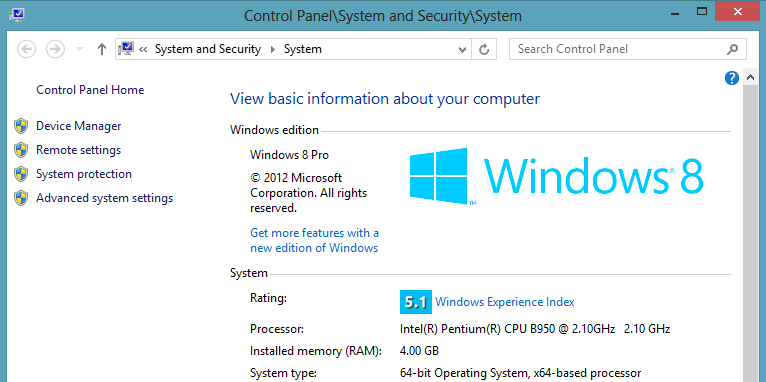
I bought Windows 8 and installed it today. My thought was:

“Sometimes you have to say: What the ****!”
– Miles from the film Risky Business 1983

windows 8


Windows 8 is required to build apps for the new Windows App Store. These apps can only be created and published with Visual Studio 2012 Express for Windows 8, and you must have Windows 8 to run it.

windows 8 app store visual studio

Visual Studio 2012 Express for Windows 8 is a free download. From what I can tell it is not hobbled or nerfed in any way. At present there is no ‘non express’ version of the Windows 8 app builder either. Microsoft is focused on increasing the number of apps in their new app store as quickly as possible.

Microsoft could have allowed Windows 7 based developers to build Windows 8 apps. However the new apps run inside the ‘Start Screen’ style interface, which no doubt has numerous low level Windows 8 dependencies.

At $40 for the digital version of Windows 8 Pro, the price is reasonable. Consider developing for Apple, which requires developer grade Apple hardware – a much higher financial bar to clear, just to start the IDE. If you are not going to develop apps for Windows 8, I wouldn’t rush to upgrade. Keep in mind, the discount for the upgrade ends January, 31st 2013.

What is different in Windows 8:

Every time around, Microsoft rearranges something. Usually the control panel gets it, or a print dialog. This time around the classic start menu is not just rearranged, it is completely gone! To the recycle bin and my computer icons – be worried pals.

To compensate for the start menu being deleted, independent app vendors have already created several start menu apps.

Navigating in Windows 8:

First off, the desktop is still there, pretty much unchanged. What is new is the tablet / touch mode which all the new fancy stuff, including the Start Screen, fall under. As a result there are some new navigational patterns to get used to, and I highly recommend getting familiar with: Windows 8 Keyboard shortcuts.

Instead of the start menu, a 17 year old concept introduced first by Microsoft in Windows 95, we now get the new, fancy and colorful Start Screen!

windows 8 start menu

The Start Screen isn’t just for launching programs, it is an alternative to the desktop. It allows visual widgets of all kinds (weather, stocks, news, sports, etc) and is clearly made for tablets. Another new bell and whistle is cleverly named the Charms Bar (mouse to the upper right, or press Windows Key + C).

windows 8 desktop

With the start menu being gone this forced me to setup the Start Screen. It is designed to house apps, but also allows desktop programs. You can either search for your programs by mousing to the upper right and selecting search, or right clicking inside the Start Screen on the background (not on an icon) and then clicking All Apps in the lower right (simple huh?). After finding the program, right click on it and a menu appears below for docking it to Start or the Task Bar. After clicking ‘add to Start’, it puts it on the far right inside the Start Screen. From there the icon can be dragged to the left and positioned in a more accessible spot.

windows 8 pin options

windows 8 start cleaned up


How to turn off Windows 8 desktop machine:

A former boss of mine was using an XP machine years ago (he was a devout Mac user), and asked me how to turn it off. I said go to Start, then click Shut Down. He laughed and was amused that to turn off a Windows machine the first thing you do is click the Start button…

Well, to turn off a Windows 8 machine, it is even more cumbersome! Access the Charm Menu (Windows Key + C), then click Settings, then click Power.  A faster way is to press (Windows Key + I), and then click Power. There are actually several more ways to shut down your Windows 8 machine.  Great strategy for boosting app sales by Microsoft – never let people leave the computer!

Internet Explorer 10 is built into Windows 8:

Windows 8 comes with IE 10, something I was curious about anyway. I still won’t use it for anything other than cross platform testing.

IE10 was made available for Windows 7 just a week ago. I’m going to leave my Windows 7 machine at IE 9 for now. That way I can test on IE9 there, and IE 10 on this computer – JOY!

IE 10 also seems to handle the awesome and boundary pushing experiments by Hakim El Hattab, including 3d effects from Meny, and Reveal.js!

Upgrading from Windows 7 to Windows 8 went smooth:

The upgrade went very smooth. No need to boot from the iso after burning it, just pop in the disk and start the upgrade from within Windows 7.

Surprisingly, the desktop is still there, icons were even in the same spot I left them in Windows 7 before the upgrade. Windows Key + D brings it up as usual. The task bar is also just as it was, at the bottom, with the same pinned icons. All my programs are working fine including TrueCrypt – something I can’t live without since I keep project specific data in an encrypted drive that I mount only when needed.

The upgrade preserved my desktop, my right click menu, all my services, and even $PATH! The Cisco VPN was the only thing that had a problem – pesky VPN always seems to break with upgrades.

One thing that it overrode was my sound settings. The first thing I always do with a fresh Windows install is shut off all system sounds. The Windows 8 upgrade set a new default sound scheme, which I promptly shut back off.

Development of Windows 8 Apps using HTML5:

The main reason for the upgrade for me is development focused. I’m looking forward to playing around and seeing what clever apps I can build. The cool thing is, Windows 8 apps can be built with HTML/CSS, jQuery, and even some HTML5… The down side is they require the use of Microsoft only tags (which makes me cringe), but I can live with that at least for now in theory. It will be pretty interesting to explore and see if the Windows App Store takes off and how JavaScript heavy web apps might be ported over.

Posted in Application Development | Tagged , | Comments Off on Notes on my Upgrade To Windows 8 for Software Developers

What makes a software team gel?

A software team that has gelled continuously runs above expectations. Bugs are fixed before they are logged. There is a feeling that anything can and will be accomplished.

A team in gel state reflects well on the quality of the product, but more importantly on the bottom line. There are huge productivity gains to be had by creating a gelled team.

A gelled team makes people want to show up, work hard, and be a part of something more than themselves. People naturally gravitate towards this unique and elusive work environment but it is hard to come by.

“Great teamwork is the only way we create the breakthroughs that define our careers.”  – Pat Riley

So, what is the secret to making a team gel?

First, the organization’s culture has to provide an environment capable of fostering a gelled team. You can’t have a gelled software team in a company that doesn’t prize its developers. Open and clear executive leadership with hands off management certainly helps.  An interesting product or technical challenge should be part of the mix.

Everything about the software should flow from the business need being addressed.  The product may need to look very sharp, it may need to provide highly accurate data, it may need to run super fast. Whatever the key differentiator is, that should be clearly understood by all team members so it becomes the focus. That way, there is no confusing what the true objective is. That differentiator can change release to release, but it should always be positive – the kind of thing you would want to tell your friends about.

Everything I have mentioned so far is macro level. There is also a micro level effect in play.  A gelled team is the positive side effect of aligning autonomy, mastery, and purpose for every individual in that team.  Achieving that requires knowing each person’s skills, interests, and life goals in the context of the current project – usually from a technical perspective.  This is where listening skills and empathy come into play.

It is important to recognize team politics. There can’t be any hidden agendas or conflicting motivations between team members.  Get that stuff out in the open and out of the way as soon as possible.

“You’ve got to give great tools to small teams. Pick good people, use small teams, give them excellent tools…so that they are very productive in terms of what they are doing. Make it very clear what they can do to change the spec. Make them feel like they are very much in control of it.”Bill Gates

Is it just one person on a team that makes it gel?  

I’d say there is usually one person who everyone looks up to and sets the example, but it takes harmony and mutual respect between team members to pull it off.

The person who makes the team gel has charisma, domain understanding, humility, strong technical expertise, and assertiveness. That person also knows how to get other people on the team to think for themselves and feel comfortable communicating with one another.

Some developers can do it. A hands on architect can do it.  A white tower architect? I doubt it. A manager who sits isolated from his/her team, I doubt it. A committed, sincere, and passionate non-technical leader can do it.

Those people who put themselves above others because of a credential, a prior experience, a diva complex, or other form of narcissism – they have no chance (and they are in for a rude awakening if they try!).

It absolutely involves working with the team on a daily basis. That means rolling up your sleeves and getting dirty, sharing the responsibility, and the credit.  It can work for geographically distant teams in special cases but that is a lot harder.

When the gel factor is gone – you notice it hard.

Posted in Work | Comments Off on What makes a software team gel?

Discobolus – the best statue of all time perhaps?

In college, I begrudgingly singed up for an Art History class to fulfill my Arts and Letters requirement. I remember the pleasant surprise one day of being introduced to my favorite work of art – the Discobolus by Myron. The original is lost, but last weekend, I got to see the best Roman copy on display, in person, at the Portland Art Museum! Once in a lifetime opportunity, and so completely worth it. When I walked around the corner and saw it, I stopped on the spot and looked for a good 3 minutes. They have it lit perfectly.

Discobolus by Myron

This picture taken in low light with my cheap point and shoot camera does not do it justice.

The statue has subtle tricks in the way it is setup that makes it ‘pop’. For example, the toes are clinched as if digging into the earth. In person it is truly amazing and relaxing to behold.

To all my design buddies out there: I highly recommend you check this out before January 6th 2013 when the exhibition is over. My wife and I got in for only $5 each via the 4th Friday program – makes a great date too!

Information about the Portland Art Museum – The Body Beautiful:
http://www.portlandartmuseum.org/

greek busts


More about the Discobolus:

The statue has always impressed me because it really looks like he is about to whip around and throw that disc!  How Myron was able to convey that, some 2400 years ago, amazes me. In fact, I don’t think anything comes close to the quality of this work.

“The moment thus captured in the statue is an example of rhythmos, harmony and balance. Myron is often credited with being the first sculptor to master this style.”Wikipedia

I have also been to the copy at the Harvard campus, which in my opinion completely misses the mark. See how it just isn’t as balanced and alive as the marble version above?

Discobolus by Myron bronze

Skip the King Tut exhibit in Seattle:

While on a short vacation in September, we also toured the King Tut exhibit in Seattle. A couple neat things there, but overall a disappointment.  There is lots of little stuff, nicknacks, and a burial mask from another Pharaoh.  For all the hype it got, I was expecting to see the 8ft tall gold sarcophagus, especially for $35… but no, all we got was a computer animated video of it in the last room. Bah!

king tut mask


Posted in Fun Nerdy | Comments Off on Discobolus – the best statue of all time perhaps?

Embedded Twitter Feed on My About Page

Wow twitter, embedding my twitter feed (called a user timeline) on my about page was super easy.

To embed your own user timeline:

Start at the twitter site. Click the Gear Icon -> Settings -> Widgets (on the left) -> Create New -> User Timeline.

Configure it the way you want, then copy/paste the script into your page. This is just as easy as embedding a youtube video! I really like the option of controlling which domains the timeline will display from. In my case it is setup to only work from laurencegellert.com.

Here it is in action:

Not exactly the biggest programming challenge in the world, but I like it when I find something that works easily and wanted to share.

By the way, since this is a WordPress site, I am using the Raw-HTML plugin to wrap the embed tag so it renders correctly.

Posted in Business | Tagged | Comments Off on Embedded Twitter Feed on My About Page

Will the Future of Software be more or less ‘Free’ ?

When it comes to software, one of the wonderful things about it is, there is generally zero cost to add an additional user to an already built system.   The effort that went into the system can be magnified many times over in terms of the value it provides to the world. No wonder software developers are such a prized resource!

The write once sell many attribute of software is something I inherently realized, even from the early days of booting from a floppy disk.  With SaaS, and now cloud services out there, it is all the more relevant.  I recently read the book Free – The Future of a Radical Price by Chris Anderson, which covers this scaling idea from just about every angle: technology, business, economics, society, even history!

Book cover Free Future Radical Price

The book is an easy going read, enjoyable, insightful, though a bit repetitive at times. It brought clarity to me personally in terms of what is going on when a company ‘gives’ me something, when I buy something, and when I avoid buying something and look for a free alternative.

Free illustrates two economies colliding:

  • The atoms economy, like oil, steel, lumber is inflationary.
    • As time passes, these goods generally become more expensive in nominal terms (due to the Fed’s policies).
    • The price of these goods can also increase in real terms.  Oil for example, is growing in demand due to population growth and global modernization.
  • The bits economy, like storage, processing power, and bandwidth, is deflationary.
    • As time passes, these ‘goods’ become relatively less expensive.
    • Moore’s law drives this for processing power, and it also holds true in storage capacity.
    • The book argues that these goods don’t just become cheaper, they become so cheap they essentially become rounding errors – too small to even worry about measuring.

When someone reads this blog, the marginal cost to me is zero.  If a million people were to read the blog, yeah, a server upgrade would be required, but it would not be 1 million times the cost, it would probably be more like ten times the cost.    This is what is putting news papers out of business.  Companies like Amazon and Google saw it coming, and positioned themselves to capitalize on the trend by pricing ahead of the curve – good for them.


So, what about software developers, inflationary or deflationary?

I would say our field is inflationary.  Demand is wildly increasing, supply is increasing (outsourcing), but with current technology there is no way to get exponential productivity gains out of software developers. The best you can hope for is a team of 10x programmers, but there are no 100x programmers, or 100,000x programmers on the horizon.  Besides, when there are more than 3-4 programmers on a team, the communication burden starts to become a drag on productivity.

Computers like IBM’s Watson change the game. When computers start writing software on their own, we’ll have some interesting issues to deal with (skynet?)…


Free removes “purchase decision” stress:

  • By making a service free, the number of potential users is maximized.
  • When a product is being evaluated for purchase, a special psychological thread kicks in (the reptile brain). From a marketing standpoint, it is nice to avoid that whenever possible.
  • The book talks about how huge the difference is.  In one study, Hershey Kisses were offered against a superior Swiss chocolate at $0.25 each, $0.01 each, and free.  Even though the monetary difference between $0.01 and free is pretty small, there was a huge difference in the consumption of the free chocolates vs the $0.01 chocolates.
 

Can you make money on Free?

Yes, but not directly. Free can be used to broaden awareness, compliment a paid service, reach more people, and attack the competition. The book has many examples, including Jello-O’s marketing campaign of the 1900’s – one of the first to do a free giveaway.

Free platforms (like League of Legends) that sell virtual vanity items such as player costumes or badges strike a nice balance. They reach the maximum number of users, but then sell perks to the serious users.  They can set different prices on different items, and evolve the economy to an optimal level – pretty cool!


What the book doesn’t talk about enough I think, is the downside of free:

  • When a product is free, people just don’t value it. They still expect it to work, but in their minds they have no serious investment in it.
  • When we buy things, they become part of who we are. As human beings we want to value ourselves through our choices, including the brands we pick. Free products don’t tap into that psychology, except for cheap skates – but they are not potential customers anyway.
  • A premium can be had for exclusivity.  Free products are by nature not exclusive. For a brand like MIT, which is now giving away free courses online via MITx (but not college credit).  They are playing a dangerous game with diluting their own mystique.
 

Here is my take away – Free is here to stay:

Just like having a URL, a twitter account, a Facebook page, and mobile app – introducing some kind of free offering that differentiates a company is a required element going forward in business.  Free is raising the table stakes.  Delivering ‘free’ is getting cheaper thanks to the bits economy. However, building a free offering is not cheap.  Thus, software developers are more in demand than ever before.  It is a good situation for us, pretty frustrating for everybody else.

Posted in Book Reviews, Business | Tagged , , , | Comments Off on Will the Future of Software be more or less ‘Free’ ?

Sublime 2 Tip – Excluding minified project files

Sublime Text 2 is my new best friend as an editor.  It is fast, it anticipates my needs, and it doesn’t get in my way.

So far, every nit I have encountered with it has an easy fix.  For example, I often use the “Find In Files…” feature to cross reference where a certain identifier is being used in the code.  I was getting frustrated however, because the minified versions of my CSS and JavaScript were appearing.  Turns out there is an easy way to set it so these files don’t show up.

Go to Preferences -> Settings – Default. Sublime will open a configuration file. I love it, no dialog.  I feel more at home in a config file than a dialog, and this particular config file is very nicely commented.

Scroll down and look for, file_exclude_patterns, then add what you need. Here is what I did:

"file_exclude_patterns": ["*.min.js", "*.min.css", ....

After saving the file, the settings take effect immediately!

Now my global searches are not cluttered with minified results. Back to work…

Posted in Code | Tagged | Comments Off on Sublime 2 Tip – Excluding minified project files

Adobe Edge Inspect Reviewed (formerly named Shadow)

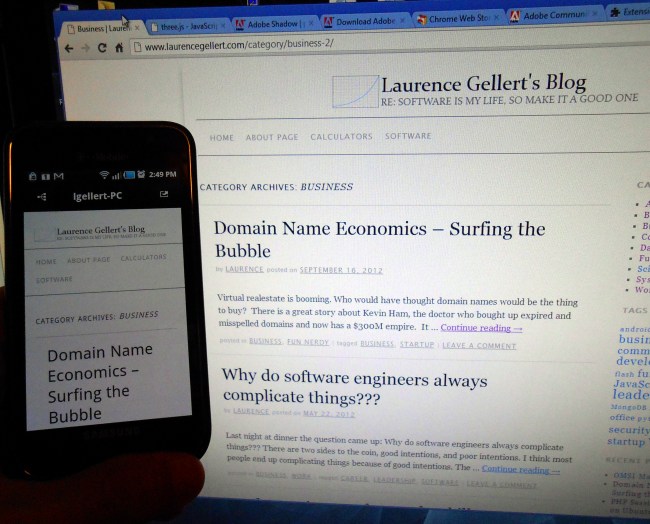
I’m currently working on responsive websites that support not only desktop browsers, but also Android and iOS – at any resolution. Testing becomes quite a task when it comes time to stop writing new features and preparing to check in. I have multiple devices to test on, and because they are physical devices, it is even more of a pain.

Adobe has created a solution to this problem in a tool called Adobe Edge Inspect:

Edit 10/31 – this is now called Adobe Edge Inspect (the software formerly known as Shadow).

Adobe Edge Inspect, from Adobe Labs, is a free utility for developers.   It mirrors / broadcasts what you are looking at in Chrome to all your mobile devices. It supports Android, iOS, and Kindle Fire.

This is a time saver. Now I am always at the same point of reference on each mobile device.

There are three places where it gets installed:  your workstation for the server component, a Chrome plugin, and as an app on your mobile device.  Took about 5 minutes to get going. The hardest part was finding the icon in Chrome:

Adobe Shadow Icon Chrome

Here it is in action:

Adobe Shadow In Action 1

Adobe Shadow In Action 2

Drawbacks:

A) Doesn’t work with session!  The first few times I tried logging into an app I was working on, my desktop went in fine, but on the phone it forwarded me to the invalid session page… From the Adobe Shadow FAQ:  ” The Shadow Chrome Extension does not access Cookies, Session Data, Authentication Information, Page Content, Browsing History or other personal data.”

So, I manually login on the phone, but then I can continue steering from the desktop.  It is nice that it lets you independently navigate on the phone – you are not completely tied to what you are seeing on the desktop.

B) Doesn’t mirror anything beyond changing URLs.  Scrolling and all page level actions, like typing, or opening dialogs, it still completely up to you on each phyiscal device.

Still, it is a neat idea. Thank you Adobe Labs!

For more information:

This talk: Fluent 2012: Paul Irish, “Javascript Development Workflow of 2013” has lots of nice goodies for pro front end developers and is only 24 minutes!

Posted in Application Development | Tagged , | Comments Off on Adobe Edge Inspect Reviewed (formerly named Shadow)

OMSI Maker’s Faire Photos

The 2012 OMSI Maker’s Faire was a blast to visit. Saw lots of interesting ideas and projects. The range of ideas is huge, and span the centuries of human knowledge.  For example there was a guy making traditional leather shoes by hand, a real blacksmith complete with on-site forge, and gladiator style sword fighting lessons!   Then, just 50 feet away there was a liquid nitrogen cooled CPU overclocked to 6 GHz, booths on 3d printers, Arduino upgrades, and moving sculptures built with hardware controllers.  Got to see a full size trebuchet fire a pumpkin about 40 yards!

Almost all the projects are open source.  Everything there is being done for the joy of it. What a great atmosphere to learn and get inspired! Thank you OMSI!

Lots of MakerBot 3d printers were there:

Omsi makers fair - Makerbot

A hand made ‘skin on frame’ kayak:

Omsi makers fair kayak

Cool fashion statement, got goggles?

Omsi makers fair goggles

Magnetically powered moving sculpture:

Omsi makers fair moving sculpture

Water cooled gaming rig:

Omsi makers fair gaming rig

Robots playing basketball:

Omsi makers fair robots playing basketball


If you couldn’t go, here are some links to feed your brain:

Dorkbot PDX

MakerBot Blog

ShareBrained Technology

TrinityLabs

Posted in Fun Nerdy | Comments Off on OMSI Maker’s Faire Photos

Domain Name Economics – Surfing the Bubble

Virtual realestate is booming. Who would have thought domain names would be the thing to buy?  There is a great story about Kevin Ham, the doctor who bought up expired and misspelled domains and now has a $300M empire.  It blows my mind because I watched it happen (literally, I was at my computer for most of the last decade).  Like most of us, I never saw where it would lead.

Today, it is extremely difficult to get a new domain name that is original, easy to spell, fits the market, and is concise.

Framing it economically, the way it played out makes perfect sense. Demand is growing exponentially against a fixed supply of .com names. There are only so many useful combinations in the English language. The upkeep cost of a domain is minimal ($10/year on average). The risk is essentially zero, unless you are squatting on a trademark.   The move to add new domain suffixes (top level domains), like .biz, .info is trying to free up supply. The problem is, they are not as respected as as the .com ending. I hope that all changes and domain suffixes become a thing of the past. Then the bubble will burst.  Dot-com is an over saturated name space, and now a virtual real estate market as I will explain more below.

Most remaining .com domains are:

  • Useless as company names
  • Too random
  • In violation of a trademark
  • Hard to spell
  • Super long, with 3-4 words in them (as in German compound words, eg Verbesserungsvorschlagsversammlung – which means a gathering of suggestions for improvement).

What to avoid:

  • Hyphens, or using numbers as trick words.  The exception is more and more companies incorporate colors or numbers into their names, which can work pretty well.
  • Words that run together.
  • Misspellings of an existing brand.
  • Words that don’t fit with your market.

There are some fun tools out there to help generate suggestions:

http://domai.nr/  – A team from San Francisco used the .nr suffix to help craft the name of their product/company. For tech sites, that is a great idea, as geeks can easily parse out the hakspeak.  If your target audience is the tech community it makes perfect sense to take advantage of domain suffixes to trick out the name. Domain.nr will automatically identify if any trick domain suffixes can be used.  The .io suffix works really well.  Another popular example is bit.ly.  (.ly is the domain suffix for Libya, .io is British Indian Ocean Territory, and .nr is Nauru).  Here is the complete list of domain suffixes.

http://www.leandomainsearch.com – Generates all kinds of names, over 500 on a page at a time using word combinations based on what you suggest. It tries adding words like epic, share, deal, now – which I think could be useful. Also comes up with stuff like cowboy, bunny, elf, busters, omatic…  The entertainment value alone is worth visiting the site and typing in a few words.

Another option is to buy an already registered domain.

There are small businesses popping up around the idea of brokering domains for sale.

http://www.namelayer.com/
http://namecore.com/

I’m very amused to see at NameLayer, the domain JunkDrawer.com is reported to have sold for $20,000!  Really, JunkDrawer.com??  I guess it is true, one man’s trash is another man’s treasure!

Here is an interesting tool for looking up what things are selling for:

http://www.domaintools.com/buy/sales-history/

For more reading:

This article contains a lot more insight into the issue.

Posted in Business, Fun Nerdy | Tagged , | Comments Off on Domain Name Economics – Surfing the Bubble