PHP Sessions not being deleted on Ubuntu Server

I came across an AWS Ubuntu 10.04 server running PHP 5.3.x that not was automatically clearing expired PHP session files. They were stacking up in /var/lib/php5/, to the tune of about 207k files and 834MB in just a few months. On an AWS EC2 instance with an 8GB boot partition, that was over 10% of the disk! If left unattended the issue would cause a system failure in a matter of months.

What the heck? The Ubuntu configuration for AWS is practically bullet proof. Linux has never been easier. Even log rotation works out of the box.

Did some investigation. First off, the php.ini file was setup to never garbage collect.

session.gc_probability = 0

That actually makes a lot of sense to me, thank you Ubuntu.

PHP can be configured to clean up expired sessions based on a random ‘/roll’, as configured by gc_probability / gc_divisor.  That doesn’t sound very robust.  I am not actually certain a user who’s request happens to trigger the cleanup would notice, but it raises my spidey sense in terms of race conditions, multi-threading errors, and the kind of strange bugs that are never replicable. Triggering disk cleanup at the exact millisecond you are trying to serve a request to a user – if it sounds like a bad idea, it probably is!

It makes more sense to control this sort of cleanup task with cron.  As it turns out, in /etc/cron.d/php the following job runs twice an hour (at :09 and :39 of every hour).

# /etc/cron.d/php5: crontab fragment for php5
#  This purges session files older than X, where X is defined in seconds
#  as the largest value of session.gc_maxlifetime from all your php.ini
#  files, or 24 minutes if not defined.  See /usr/lib/php5/maxlifetime

# Look for and purge old sessions every 30 minutes
09,39 *     * * *     root   [ -x /usr/lib/php5/maxlifetime ] && [ -d /var/lib/php5 ] && find /var/lib/php5/ -depth -mindepth 1 -maxdepth 1 -type f -cmin +$(/usr/lib/php5/maxlifetime) -delete

Note this reference: /usr/lib/php5/maxlifetime

Turned out on this server, the maxlifetime file did not exist! So the cron job wasn’t doing anything.  The one line command does the following:

  1. If /usr/lib/php5/maxlifetime exists and is executable, and…
  2. If the /var/lib/php5/ directory exists, then…
  3. Find the files in the php session directory X minutes older than the value reported by maxlifetime, and delete them.

I created that file and set it to echo the number of minutes the sessions should be kept around for:

sudo chmod +x /usr/lib/php5/maxlifetime

cat /usr/lib/php5/maxlifetime
#!/bin/bash
echo "60"

In this case, one hour seemed prudent. The default gc_maxlifetime is 1440, which is 24 minutes.  Watch out: the find command cmin argument is in minutes, but the php gc_maxlifetime is in seconds.

Posted in Sys Admin | Comments Off on PHP Sessions not being deleted on Ubuntu Server

What is a Full Stack developer?

Is it reasonable to expect mere mortals to have mastery over every facet of the development stack? Probably not, but Facebook can ask for it. I was told at OSCON by a Facebook employee that they only hire ‘Full Stack’ developers.  Well, what does that mean?

To me, a Full Stack Developer is someone with familiarity in each layer, if not mastery in many and a genuine interest in all software technology.

Good developers who are familiar with the entire stack know how to make life easier for those around them. This is why I’m so against silos in the work place. Sure, politics and communication challenges get in the way in large organizations. I think the point Facebook is going for with their hiring policy is, if smart people use their heads and their hearts, a better product gets built in less time.

Layers of the Full Stack:

  1. Server, Network, and Hosting Environment.
    1. This involves understanding what can break and why, taking no resource for granted.
    2. Appropriate use of the file system, cloud storage, network resources, and an understanding of data redundancy and availability is necessary.
    3. How does the application scale given the hardware constraints?
    4. What about multi-threading and race conditions? Guess what, you won’t see those on your development machine, but they can and do happen in the real world.
    5. Full stack developers can work side by side with DevOps. The system should provide useful error messages and logging capabilities. DevOps will see the messages before you will, so make them count.
  2. Data Modeling
    1. If the data model is flawed, the business logic and higher layers start to need strange (ugly) code to compensate for corner cases the data model doesn’t cover.
    2. Full stack developers know how to create a reasonably normalized relational model, complete with foreign keys, indexes, views, lookup tables, etc.
    3. Full stack developers are familiar with the concept of non-relational data stores and understand where they shine over relational data stores.
  3. Business Logic
    1. The heart of the value the application provides.
    2. Solid object oriented skills are needed here.
    3. Frameworks might be needed here as well.
  4. API layer / Action Layer / MVC
    1. How the outside world operates against the business logic and data model.
    2. Frameworks at this level should be used heavily.
    3. Full stack developers have the ability to write clear, consistent, simple to use interfaces. The heights to which some APIs are convoluted repel me.
  5. User Interface
    1. Full stack developers: a) understand how to create a readable layout, or b) acknowledge they need help from artists and graphic designers. Either way, implementing a good visual design is key.
    2. Can include mastery of HTML5 / CSS.
    3. JavaScript is the up and coming language of the future and lots of exciting work is being done in the JavaScript world (node, backbone, knockout…)
  6. User Experience
    1. Full stack developers appreciate that users just want things to work.
    2. A good system doesn’t give its users carpal tunnel syndrome or sore eyes. A full stack developer can step back and look at a process that needs 8 clicks and 3 steps, and get it down to one click.
    3. Full stack developers write useful error messages. If something breaks, be apologetic about it. Sometimes programmers inadvertently write error messages that can make people feel stupid.
  7. Understanding what the customer and the business need.
    1. Now we are blurring into the line of architect, but that is too much of a hands off role.
    2. Full stack developers have a grasp of what is going on in the field when the customer uses the software. They also have a grasp of the business.


Other Pieces of the Puzzle:

  1. Ability to write quality unit tests. By the way, even JavaScript can have unit tests these days.
  2. Understanding of repeatable automated processes for building the application, testing it, documenting it, and deploying it at scale.
  3. An awareness of security concerns is important, as each layer presents its own possible vulnerabilities.


Closing Thoughts:

It is very bad practice to tightly couple code to a specific implementation (library, OS, hardware, etc). Just because a full stack developer understands the entire spectrum doesn’t mean they have license to take shortcuts. Well, actually they do if it is a build and throw away prototype.

Technology start-ups need full stack developers for their versatility!  However, as an organization matures, it needs more and more focused skills.

I’m not sure you can call yourself a full stack developer until you have worked in multiple languages, platforms, and even industries in your professional career. Full stack goes beyond a ‘senior engineer’, as it is along the same lines as a polyglot programmer but with a higher view of all the connecting pieces. Note that on my list, only items 3-5 involve writing code.


Posted in For New Developers, Work | Comments Off on What is a Full Stack developer?

How to set the Expires and Cache-Control headers for all objects in an AWS S3 bucket with a PHP script

As of the current AWS API, setting the Expires and Cache Control headers for all objects in an AWS S3 bucket requires a script. It is possible to do it one file at a time through the AWS control panel, but that is tedious if not impossible for buckets with lots of files.

I was hoping the AWS CloudFront ‘edit cache behavior’ screen would be a way of getting around this. There is a CloudFront distribution option for overriding an origin’s cache settings. For whatever reason, this did not work. I tried creating a totally new distribution, editing an old one, waiting overnight, nothing made a difference. Maybe it is fixed by now and worth another try?

AWS Edit Cache Behavior

With the ‘edit cache behavior’ being a dead end, I whipped up a script to explicitly set the headers at the S3 source on a per file basis.


Requirements:

  • PHP binary installed on the command line. I’ve used php 5.3.6 successfully with this script.
  • Download of the AWS PHP SDK
  • AWS credentials, found in the AWS control panel under ‘Security Credentials’.


It turns out using the AWS PHP SDK, there is a trick to getting this done. It involves using the copy_object method with the metadataDirective set to REPLACE. Not as clear of an API as it could be, but it got the job done. Hopefully this saves a few readers some frustration.

// updates all the files in the s3 bucket to expire in 3 years

// configuration
define("AWS_KEY", "YOUR AWS KEY");
define("AWS_SECRET_KEY", "YOUR AWS SECRET KEY");

$bucket = "YOUR BUCKET NAME";

// path to the the php sdk you downloaded
require_once("aws_php_skd/sdk.class.php");    


// AWS S3 paginates the list of items in bucket
// in this case, we will go X at a time:
$MAX_KEYS = 200;

$s3 = new AmazonS3();
$marker = null;
$n = 0;

// prime the list
$list = $s3->list_objects($bucket, array(
    'marker' => $marker,
    'max-keys' => $MAX_KEYS
));

// loop through the paginated list of files in the bucket
while(count($list->body->Contents) > 0) {

	foreach($list->body->Contents as $file) {
		$filename = $file->Key;
		$marker = $filename;		
		$n++;
		echo $n . " PROCESSING: " . $filename . "\n";
		
		// replace the existing object with a copy of itself, 
		// plus set the new expires header
		$response = $s3->copy_object(
			array('bucket' => $bucket, 'filename' => $filename),
			array('bucket' => $bucket, 'filename' => $filename),
				array(
				'acl' => AmazonS3::ACL_PUBLIC,
				'metadataDirective' => 'REPLACE',
				'headers' => array(
					 "Cache-Control" => "max-age=94608000",
					 "Expires" => gmdate("D, d M Y H:i:s T", 
					              strtotime("+3 years"))
				)
			)
		);
			
		if(!$response->isOK()) {
			echo $n . " PROBLEM: ";
			var_dump($response);
		}	
	
	}
	
	// get more for the next loop
	$list = $s3->list_objects($bucket, array(
		'marker' => $marker,
		'max-keys' => $MAX_KEYS
	));
}
 
echo "DONE!\n";

More Information about Cache-Control and Expires headers:

Setting the expires and cache-control header is a good idea if you want client browsers to  cache your content. It saves on bandwidth and makes your site run faster (especially in concert with CloudFront).  3 years out seemed like a good number to me.

There are two headers to set.  Expires is from the HTTP 1.0 standard, while Cache-Control was introduced in the HTTP 1.1 standard. Depending on what kind of client is connecting, a different standard might be used.  I’d think HTTP 1.1 would be the more popular choice given it came out in 1999!

Keep in mind, you will need to run this script every so often, since in three years, the expires header runs up.  The cache-control header works like a TTL, and it is based off when the client gets the file. However, the expires header is a fixed date. The way the expires header is designed is annoying.


Posted in Code, Sys Admin | Tagged , , | Comments Off on How to set the Expires and Cache-Control headers for all objects in an AWS S3 bucket with a PHP script

Architectural Components to Plan For From Day 1

Businesses rely in part, on technology, to differentiate themselves. There is no cookie cutter solution that allows a business an exclusive chance to be better and faster at serving customers. Simple solutions are already used by everyone, so there is no edge to be had. As a result of this market force, custom software is constantly being asked to bridge the gap.

Custom projects are often started from scratch and serve a unique purpose. Within that project, a tension exists between building the prefect thing, and launching on time within budget. The hidden part is, architectural factors that align with business needs should not be cut for the sake of the schedule. If these corners are cut, what you have is a time bomb. That might not be a problem, but a core tenant of mine is communication. Getting these ideas out there from the start is key to expectations management.

Striking the balance between architecture and delivery is a real art form.

So, how can the success of such a project be helped over the next 1-2 years and beyond? Getting this right involves understanding the business, understanding the customer, and understanding the technology that will bridge the two.

1) Understanding the Business:

Get the team together and discuss the business model the software addresses.

  • Where is it going in 1-2 years?
  • What features are wanted in 2-3 months, in 1-2 years?
  • How could the plan change?
  • What are the primary deliverables (must have), vs the secondary deliverables (nice to have).


2) Understanding the Customer or User:

It really bothers me that so many software professionals ignore or even despise the customer. Having empathy for the customer is a number one priority when it comes to ease of use, and thus success of a project.

  • What does the customer care about?
  • In what ways can the process, or user interface be simplified?
  • How important is the look and feel of the software? If this is very important, make sure a designer is part of the project.

3) Understanding the Technology that Bridges the two:

The following is a list of concepts to consider before writing code. It is MUCH smarter to delay the first launch by a few days and include architectural foundations, rather than try to compensate for them later across 500 places in the code.

  • Platform and framework:
    • This will determine many of the initial constraints, like what kind of servers your system runs on (linux vs windows), how well the system will scale, what kind of skills will be needed in the future, and what kind of technical challenges to expect.
  • What environments or clients are involved for now, and possibly in the future?
    • Desktops
    • Mobile phones / tablets
    • Offline mode?
    • 3d goggles?
  • Internationalization
    • Are your users in different timezones?
      • Recommendation: set the server to UTC, store all times in UTC. Even if you think you don’t need it, UTC makes a lot of sense in cloud hosted environments.
      • Let each user set their timezone preferences and display the local time by converting from UTC.
    • Does the system need to support multiple languages now or someday in the future? For example, does the application need to accept special characters like ö, or Japanese characters? Does the login page need to work in English and in Chinese?
  • Transactions:
    • What if data gets lost, how big of a deal is that?
    • Transactionality is expensive to implement after the fact. Some platforms do not support it, especially open source, so be careful there.
  • Durability:
    • How should the system react when something goes wrong?
      • Your users might tell you the site is having a problem – if you are lucky. When a site is down for me, normally I leave and never come back.
      • Fault tolerance needs to be anticipated for.
      • Geeks will want to adds lots of dependencies, but they don’t usually think in terms of what happens when one of those dependencies is not working. You want to design the system so that if one dependency is not available, the system continues to operate normally from the customer’s perspective.
  • Recording of Events and Historical Data:
    • Setup a way of logging the key events in the system so you can reconstruct what happened.
    • Use try/catch blocks to trap for conditions, log, and compensate accordingly. These can even be done in languages like PHP and JavaScript!
    • It could be advantageous to setup a full change history for certain types of records.
  • Re-usability model:
    • SOA – Service Oriented Architecture is worth looking at, especially if many different types of users connect to and consume the application.
    • API – Application Programming Interface, very handy to build in if integration with 3rd party systems is expected.


Closing Thoughts:

Your team needs an architect level person who understands these three issues. Developers will have to be told to build these items in, since they won’t have the same grasp of the big picture.

When it comes to getting it all done, breaking up the work into releases plays a major role in striking the balance between good enough and perfect. Focusing on the near term deadline avoids the temptation to gold plate the code.


Posted in For New Developers, Work | Tagged , | Comments Off on Architectural Components to Plan For From Day 1

Dealing with Chaos on a Software Project

Many software projects find themselves in chaos. Perhaps the department is growing like crazy, new hires left and right, no one really understands the project but a launch is on the horizon. Another option is the department is short staffed and is under considerable pressure to deliver. Political battles and turf wars are being waged in management to determine the fate of the project. Priorities thrash left and right. In the mean time there are more change orders in the last week than total items done. This has been going on for several months, perhaps since the beginning.

How does one curb the Chaos?

The first step is to simply acknowledge it, and steadily point it out to others in a diplomatic way. A fish does not know it is surrounded by water. Some organizations do not realize the inherit limitations of the way they operate. Often this is a cultural thing in the organization and it can be self re-enforcing.

Some ammunition against chaos:

  • Chaos is not efficient
  • Chaos does not lead to quality
  • Chaos increases risk
  • Chaos increases burnout rate
  • No successful organization operates in chaos indefinitely


The main method of change is at the human level:

In a larger company, project management, not technology should be the group responsible for getting this straightened out. Involving project managers is a smart idea, take them out to lunch, figure out their interests, and then mention how they might be able to help. In my experience project managers are always looking to expand their sphere of influence.

Management, or at least a section of it, needs to be behind the efforts to change. When influencing, avoid using the word ‘chaos’ to describe the problem. In fact avoid negative connotations as much as possible. Instead, offer constructive advice such as “it has been a long time since we had a planning meeting, I think that would be a good idea”, or “ticket systems are really helpful to track requests and organize work”, or “it occurs to me a unit test would be helpful to certify the data is accurate and we can use it anytime we refactor”. It may take up to a year to get momentum.

Some people will block the efforts, they may have habits, political agendas, or a natural aversion to change. Whatever the case is, do not hold it against them, just work with them when possible, but work around them if needed.

Technology Concepts that Curb Chaos:

These are essential best practices in software development that will make life easier, more productive, and fun:

  • Development Process – Start reading about development processes and share your findings informally with coworkers in various departments. This will get people thinking about being more organized, and hopefully a little excited.
  • Requirements Gathering – Advocate for the company to allocate time to the planning phase. Do not hold it against people if they change their mind, or remember a detail opposite of what they told you a week ago – that is human nature. Go back through the logic of the decision and verify. This takes a lot of patience!
  • Ticket Systems – Choose a system that both IT and non-IT users can access and understand. That will cut down on the length of the line at your desk, and force people to put their thoughts in writing before bothering you. Someone will need to manage the system, and that could be an opportunity to create a new role for yourself.
  • Unit testing – This gives confidence during refactors, and helps ensures quality, plus it is an addicting way to build software.
  • Revision Control – if you are editing live files on the server, or often having conflicts between developers, start using Git, Mercurial or even Subversion. Compared to lack of source control, they are all fine choices, easy to use, and free.
Posted in Application Development, Work | Tagged , , | Comments Off on Dealing with Chaos on a Software Project

Basic Coding Standards and Guidelines

Naming conventions in coding are important for maintainability and quality.

Without a standard to follow, each developer (and sometimes each file) will take on a standard of its own (or be just a random mash of whatever).

Deciding on a standard as a group is tougher than it sounds. Discussing standards leads to holy wars. Whenever there are two ways to do something, invariably the rebellious ones will pick the opposite of what the established group prefers.

Here is what makes the most sense to me if I were to start from scratch on a project:

Camel Case (aka medial capitals):

Used for variables and method names:
public function getLogin() { … }
private String loginId;
private String lastSearchTerm;


Upper Camel Case (aka PascalCase):

Used for class names.
public class MyObjectRules
public class SquirrelNutZippers


Underscores:

Underscores are great for long variable names, table names, field names:
var logins_in_group_count = 10;

Underscores are especially good in constants:
public static final int MAXIMUM_LIMIT = 42; //java
define(“MAXIMUM_LIMIT“, 42); // php


Other Symbols:

Hyphens, and other symbols are rarely used in most modern languages these days. Avoid getting fancy with special characters.


Standard Indentation and Formatting:

Standard rules for indentation, code formatting, comments, and white space is important. Editors like IntelliJ and Eclipse can do a lot of this automatically. Pick a standard that makes sense, looks good, and go with it. Older standard are too aggressive about line length and end up doing a lot of ugly wrapping. Most developers today are either on wide screen laptops, or have dual monitors. Given new technology and tools, a line length closer to 160 is more reasonable.

If you employ an automated build (which you should on a large project), there are tools that can scan for deviations from your configured standard (see Sonar).


Private Class Variables:

Decorating member variables (eg private class variables) with a m, or an _, is something I used to do, but no longer do unless coding to a standard that requires it. These decorators become ‘warts’ in code. Modern IDE’s make it easy to track down variables. Why add cruft?


Delineating the type of the variable in its name:

In the old days, there was no auto completion or tool tips, so it was very helpful to encode the variable type in its name. For example:

int iCount;
String sName;

With modern tools, this is crufty and needless. Revised:
int count;
String name;

Much cleaner.


Case Conventions when Naming Database Objects

When it comes to naming database tables and fields, consistent naming conventions are important. When done right it makes life easier later. There are several layers to consider: RDBMS explorer tools, SQL queries, and Object Relational mapping tools/frameworks.

A data model has many users (backend coders, application coders, ETL tools, etc). This is not to say they all couldn’t be loosely coupled and do their own thing. The point is, going with something sensible to start with can save everybody time.


Database Objects:

Different RDBMS navigation tools like pgAdminIII, MySQL Work Bench, HeidiSQL, SequelPro, DB Visualizer, MSSQL Management Studio… all have their own take on how to represent the list of tables and columns in a database. Some preserve case, others send everything to lower case (this might be a configuration option, like in MySQL, or it might be your GUI tool trying to be helpful). For this reason, camel case isn’t always a good answer. Using underscores to separate words and naming tables and columns in lower case has been a good fit for me. This avoids debate about how to name a field like login_id, it could be named as any one of the following {Login_Id, Login_ID, loginid, LoginId, loginId, loginID}.

For example, here is a simple schema with three entities: Logins, Groups, and many to many between Logins and Groups, named based on the underscore convention:

login.id int
login.user_name varchar(250)

group.id int
group.name varchar(250)

group_login.id int
group_login.group_id int
group_login.login_id int

Without underscores as a visual break, some tools display listings like grouplogin.groupid, which is a harder for the eye to parse.


SQL Conventions:

I prefer to capitalize all the SQL keywords, like CREATE, ALTER, SELECT, WHERE, and use the underscore notation for columns and fields.

SELECT * FROM login WHERE user_name LIKE ‘john%’;

ALTER TABLE login ADD COLUMN login_count INT NOT NULL DEFAULT 0;


OR Mapping Layers:

If you are using a framework like Django, Hibernate, Symfony, etc that is capable of scanning the database schema and generating objects based off column names, take care to align your field names with the behavior of the framework so getters and setters come out readable.


Closing Thoughts:

I’m not going to talk about where to put the curly braces. What I do believe in is consistency. If the code base is inconsistent, then they are in the wrong place!

Posted in Code, For New Developers | Tagged | Comments Off on Basic Coding Standards and Guidelines

The Three Ways of Setting Breakpoints in JavaScript

There are at least three ways to set breakpoints against JavaScript running in the browser.

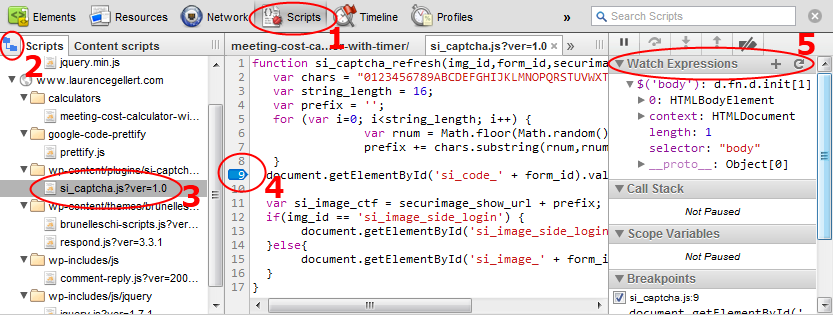
1) Use Chrome’s developer tools or Firebug to locate the line of JavaScript, then set the breakpoint with the mouse.

To do it in Chrome, first open the developer tools (Ctl + Shift + I), or go to the wrench menu, Tools, Developer Tools.

  1. Select the Scripts tab.
  2. Click the little folder icon on the far left.
  3. Navigate to the source file where you want to set the break point.
  4. Find the line in question, then click the line number to set the breakpoint (a little highlighted triangle will appear).
  5. When the breakpoint is fired, you get access to the watches section where you can run arbitrary expressions, see all the variables in scope, and the call stack. Sweet!

Chrome dev tools set breakpoint


2) Use the ‘debugger’ statement. This is handy in two cases:

A) When the JavaScript file is hard to navigate into (this is true for complex web apps with lots of scripts, iframes, etc).

// cause the debugger to fire every time
debugger;

B) The breakpoint should only fire for a certain condition.

// example 2, only if the force is with us, do we get a breakpoint
if(theForceIsWithUs) {
    debugger;
}

Yoda Quote: “Though powerful the debugger statement is, there is a darkness surrounding it.  End with nerd ridicule and screaming customers debugger statements that go into production do, yes.. Eh hi hi hi hee…


3)  Webstorm by IDEA supports setting breakpoints in the IDE. This requires launching the JavaScript debugger from IDEA. It must be configured in advance so it understands how to map JavaScript on the development server to JavaScript files in your environment. IDEA will automatically install a Chrome or Firefox plug-in to facilitate. This is pretty new technology and can be touchy.

Webstorm set breakpoint

Closing Thoughts:

Forget all those console.log(x) statements or alert(z) dialogs *shudder*.

Breakpoints are a powerful tool the pros in established languages like C++ and Java swear by. There is a misconception out there that JavaScript cannot do breakpoints, unit tests, code analysis, etc. That was absolutely true in the days of Netscape 2.0. However, times have changed.

Back in 1995, who would have thought JavaScript would be the language of choice for the future? With the best minds in the world working on things like the Google V8 engine and Node.js JavaScript will only get more momentum (and better tools).


Enjoy!

Posted in Application Development | Tagged , | Comments Off on The Three Ways of Setting Breakpoints in JavaScript

Why do software engineers always complicate things???

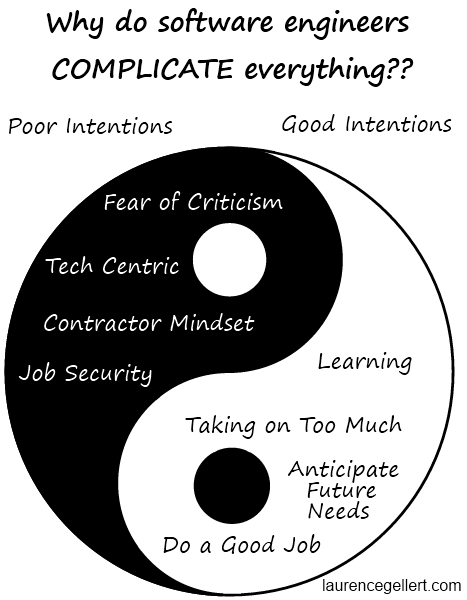
Last night at dinner the question came up: Why do software engineers always complicate things??? There are two sides to the coin, good intentions, and poor intentions. I think most people end up complicating things because of good intentions. The poor intentions are worth being aware of too, but I don’t expect the worst in others. In any case, overly complicated software indicates wasted effort and a problem for the business.

Ying and Yang of why software engineers complicate things


The good intentions:

Desire to use the latest technology:

Every good software professional loves to learn. It is part of their DNA.  The software profession forces people to learn in order to stay relevant because every 3 years a new cycle starts.

Most people do not want to eat the same bland oatmeal everyday. Adding a few raisins is healthy. This can get way out of hand if left unmanaged. Imagine a team of software developers all hopped up on sugar – spinning in their chairs and climbing the walls.

Staying technologically current makes business sense, provided the technologies selected have a stable following and are of good quality.  However, complexity is introduced if many new technologies are used  at once, or new and old technologies are combined.

Software engineers, though they can be pessimistic in nature, rarely look closely at the downsides of using a new technology in your business.

Solution: Relate new technology back to the business first. Be careful of getting too fragmented.


Trying to do too good of a job:

Sometimes people get in over their head. Only wise confident professionals know when to admit it. Young engineers will over reach and senior engineers will incorrectly apply out dated approaches. Being perfect is not possible. In spite of how illogical it is, software professionals will spend a lot of time trying to perfect their work. They may introduce more bugs than they fix through this effort.

Solution: Figure out what is ‘good enough’ and go for that. This varies widely by industry and company.


Predicting the future:

Software professionals are very smart people. They try to anticipate what might happen down the road and build that into their design. In software, countless architectural features are created to solve problems that are not yet here and may never be.

Solution: Check with someone higher up to see if your grand architecture makes sense, or if it is just a lot of crap for QA to test through.


The bad intentions:


Fear of Criticism from Peers:

One approach to building software is to use every possible technique, design pattern, and tool to build a feature. Adding complexity is a way of showing off geek muscle. How could a peer possibly find fault in such a complete approach?? This is along the lines of the Second System Effect.  (It is not like scoring touchdowns on home coming night were ever an option…)

Software Engineer A: Look everyone, my new feature can do X, Y, and Z!
Business Owner: The customer only needs it to do X.
Software Engineer A: But Y, and Z are so cool because of {insert random geek sound bite}!
Software Engineer B: Wow, Y and Z, you rule! (thinks to self: I should add that into my project…)
Business Owner: *sigh* 

Solution: Quality of the data model, code, tests, and documentation should not be sacrificed. Recommend the simple solution but present the complex solutions to prove you thought about it. Then see what makes more sense for the business. You might be surprised.


Job Security:

Insecure programmers will purposefully wall themselves off with bad code, undocumented systems, and tribal knowledge.  Barnacles see complexity working in their favor.

Solution: Think twice before taking this route, your peers will smell the code, and your manager will be frustrated. Your job is to make your job obsolete so you can get on to the next challenge.


Lack of interest in the business and inability to communicate:

Some geeks are only interested in the technical aspects of their job. They care nothing for the business or the economic factors that justify their job’s existence.

Solution: Go out to lunch with a non-technical person. Get to know the business and those who really run it.


Contractor Mindset:

In contracting, if a task takes an extra day to complete, well the customer will just have to pay for that. That is considered ‘making money’.

Solution: Repeat business doesn’t go so well when people feel they got the short end of the stick. Reputation means more than a few billable hours. Work hard to manage expectations and let the customer know every time you save them money because you are so smart and dedicated to them.

Closing thoughts on the complexity issue:

The KISS principle is not taught in school!

K.I.S.S. = Keep It Simple Stupid

Does a short and sweet essay score higher than one with all the bells and whistles? – NO!

On a final exam, would a one sentence answer pass? – NO!

The education system encourages people to find the ‘right answer’ by knowing everything about the domain and then showing off their breadth of knowledge in a long winded report. That is great for research, and is necessary in many disciplines. However, we rarely have all the facts in business. As Collin Powell stated: once you know 80% of the information stop analyzing and go with a decision.


Conclusion:

Software is complex in nature, but it shouldn’t be for users.  Sometimes it is honestly just a complex problem and there is nothing anybody can do about it.

Excellence in software, coding aside, involves understanding the business and unselfishly delivering results to further that end.

Quality is a continuous balancing act. It should be heavily influenced by the priorities of the business.


Posted in Business, Work | Tagged , , | Comments Off on Why do software engineers always complicate things???

Software Careers for the Future

Today’s topic is success as software professionals.  Many important lessons on this subject can be found in an unlikely place – Colin Powell’s auto-biography “My American Journey”, published in 1995.  Hey, what does this have to do with software you might ask? As I keep saying, success in a technical discipline like software increasingly hinges on communication and leadership ability.  My American Journey is a manual for success.

Colin Powell

My first observation is how Colin Powell (a C student in high school) found himself in a huge organization that he could flourish in and would eventually lead.  This happened to be the military at the height of the cold war. More on the cold war later…

Powell sets out career themes which he reinforced, rather ‘drilled’ throughout the book. He kept sayings on his desk to remind him of things he learned the hard way. Some of these are quoted below:

Communication:

In any presentation Powell would take care to manage his words, posture, and body movements. These are techniques he learned at officer training school. In the civilian world we have Toast Masters.

“Tell ’em what your gonna’ tell ’em. Then tell ’em what you just told ’em.”

At press conferences he would do his best to give the answer he wanted to hear, vs. answering the question put to him.

“Never let them see you sweat.”


Attitude:

“Perpetual optimism is a force multiplier.”

This is real. The startup I was part of in 2002 had this going for it. I have helped it manifest again and again in my career. It is a joyous feeling to begin each day on the job surrounded by the force multiplier.

Sometimes, we get crappy assignments. Here is how to deal with it:

“If you get the dirty end of the stick, sharpen it and turn it into a useful tool.”


Change:

Okay, back to the cold war… When Powell became the Chairman of the Joint Chiefs of Staff, he saw Russia collapsing and the cold war coming to an end. This made much of the US mililtary strategy obsolete as the 1980’s drew to a close. Powell saw the magnitude of this earlier than most.  Instead of holding onto the past, he pushed for a 25% reduction in the size of the military. This was in spite of the fact he personally loved the military and knew how damaging the cuts would be to service men and women entrusted to his care.  The rules had changed.  He was in a position to do something about it. Understanding the reoccurring dynamic of change, as illogical and random as it often can be, is a key to success.

Software becomes obsolete and that can take people with it. Here’s a trick for staying ahead of change that Powell learned from a lawyer during a round of downsizing:

“Avoid having your ego so close to your position that when your position falls, your ego goes with it.”

So what does a career in software look like?

There is no 30 year career map for a programmer like there is for a 4 star general. It is more like a steep ramp from Jr. to Senior in 5-7 years that involves a 3-4x pay boost.  Then what? Architect, principal engineer, CTO, freelancer, teacher, entrepreneur, author, consultant?   The answer is Tabula rasa – a blank slate.

So how does a software professional flourish? Today nobody cares if you did DOS 5.0 programming.  In fact they may feel sorry for you.  However, if you lead a team of diverse individuals to succeed on a project that made money, it is absolutely relevant and always will be.  The software professional of the future is not a coder, but a communicator and leader who understands the business and the code.  Coding is a commodity. Understanding how to apply the commodity to get the outcome is where the action is. It does not hurt to genuinely enjoy the challenge of working with customers.

Final quote from Powell, especially when it comes to your life – “Have a vision. Be demanding.”

More information on Colin Powell:
http://en.wikipedia.org/wiki/Colin_Powell

A complete list of his rules can be found here:

Posted in Book Reviews, For New Developers, Work | Tagged , | Comments Off on Software Careers for the Future